
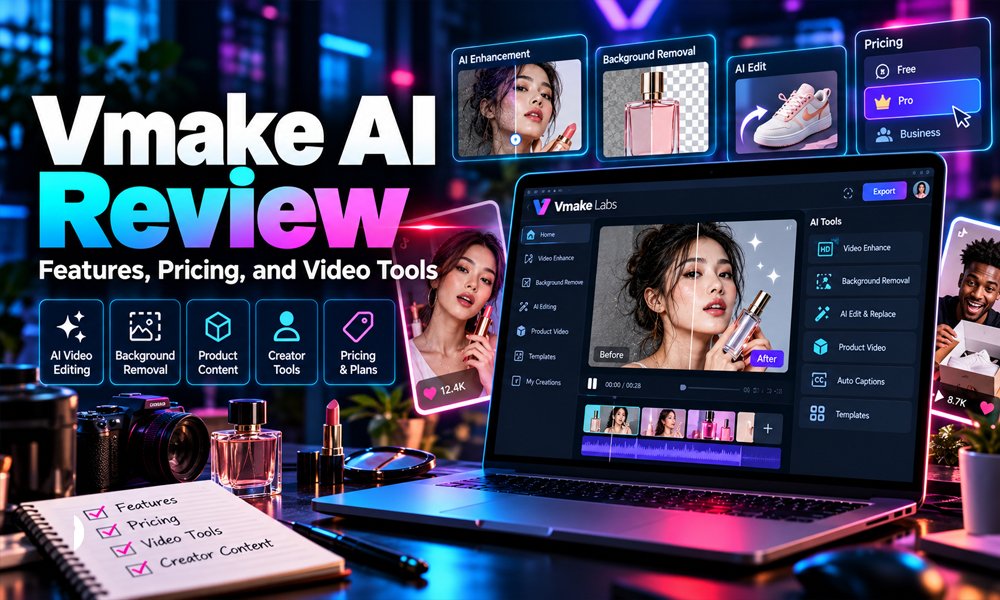
Vmake AI, now known as Vmake Labs, has grown from a focused b platform for product videos, UGC-style content, enhancement, captions, translation, and other social media workflows. It is mainly aimed at e-commerce sellers, creators, small brands, and marketers who want to produce short-form video without relying on a full production team.
The platform is useful because it combines generation and editing tools in one place. Instead of creating a video in one app, enhancing it in another, and adding captions somewhere else, Vmake AI tries to keep those tasks inside a single workflow.
What Is Vmake AI?
Vmake AI is an AI-powered video creation and editing platform designed around product-focused and social media content.
The service now operates under the Vmake Labs name, reflecting its wider range of tools. Users can create product videos, UGC-style clips, avatar videos, captions, translated content, enhanced footage, and AI-generated scenes.
Its strongest appeal is simplicity. Many tools follow the same basic process: upload an image or video, choose the feature or model, generate or edit the content, review the result, and export the final version.
Main Vmake AI Features
Vmake offers several tools, but a few stand out because they cover the most common content-production tasks.
UGC and Product Videos
The UGC video tools are built for brands that want social content without filming every version manually. A seller can start with product assets and generate promotional clips that resemble native short-form content.
The Product Showcase tools follow a similar idea. They are particularly useful when a business already has strong product photography but needs motion-based content for ads, social feeds, or product pages.
AI Video Generator
Vmake also provides access to multiple AI video-generation models. The platform currently lists models such as Seedance, Sora, Veo, Wan, and Kling within its broader generation workflow.
This gives users more flexibility because different models can perform differently with people, movement, camera motion, products, and stylized scenes.
AI Avatar Videos
Avatar tools are available for creating presenter-style content without recording a real person. This can work well for product explainers, multilingual videos, repeated campaign variations, and basic promotional scripts.
The limitation is realism. AI presenters can look convincing in simple scenes, but natural emotion, product handling, and subtle facial movement may still feel less authentic than a real creator.
Video Enhancement and Cleanup
The Vmake AI Video Enhancer is useful when the starting material already exists but needs improvement.
It can help reduce blur, improve clarity, clean noisy footage, and upscale video. Higher-end modes support larger output resolutions depending on the plan and feature being used.
Vmake also offers tools for:
- Background removal
- Noise reduction
- Video upscaling
- Watermark and text removal
- Video-to-text conversion
- Subtitle generation
These features are often more practical than full AI generation because they solve common editing problems with existing footage.
Watermark and Text Removal
The video watermark remover can detect and remove text, logos, subtitles, and other selected elements from footage. Vmake also provides manual selection options for more targeted cleanup.
This can be useful for a brand updating its own old videos, replacing outdated text, or preparing existing assets for a new campaign.
Users should still respect copyright and licensing rules. Removing a watermark from someone else’s content does not provide permission to reuse it.
Captions and Translation
Vmake includes automatic captions and translation tools, which are useful for short-form content that may be watched without sound or adapted for different markets.
Captions can improve accessibility and make fast-moving social videos easier to follow. Translation tools can also reduce the need to record a completely new version for every language.
However, important translated content should still be reviewed by a fluent speaker. Automated translation can miss tone, brand language, or local phrasing.
What Can You Create With Vmake AI?
The platform supports several practical content types, including:
- Product promotional videos
- UGC-style ads
- Social media clips
- Talking-avatar videos
- Product demonstrations
- Before-and-after videos
- Multilingual content
- Enhanced versions of older footage
- Short videos from product photos
- Captioned and cleaned-up marketing clips
This makes Vmake AI particularly relevant to e-commerce brands and small marketing teams that need to create multiple content variations quickly.
Vmake AI Pricing
Vmake currently offers Free, Plus, and Pro plans. Features, credits, export quality, and usage limits vary by tier.
| Feature | Free | Plus | Pro |
|---|---|---|---|
| Credits | 20 daily | 1,000 monthly | 4,500 monthly |
| Standard video export | Up to 720p | 1080p | Up to 2K |
| AI generation export | 1080p with watermark | 1080p | Up to 2K/4K |
| AI model access | Limited | Expanded | Broader access |
| Commercial use | Not listed | Included | Included |
The Free plan is best for testing the platform. Plus is more suitable for regular commercial use, while Pro is aimed at users who need higher limits, more models, or better export options.
Because pricing and billing options can change, it is sensible to check the current checkout page before subscribing.
Vmake AI Benefits
The biggest advantage of Vmake AI is speed. It can reduce the number of separate tools needed for everyday social video production.
Other useful benefits include:
- Product-focused video workflows
- UGC-style content generation
- Multiple AI video models
- Built-in captions and translation
- Video enhancement and cleanup tools
- Free testing option
- Commercial-use support on paid plans
- Less dependence on advanced editing skills
For small teams, these features can make it easier to test multiple creative ideas without organizing a new shoot for every concept.
Limitations to Consider
Vmake AI is useful, but it does not remove the need for human review.
Generated videos may occasionally contain warped logos, changing text, unnatural hands, inconsistent packaging, or unrealistic movement. Complex scenes are more likely to produce visual errors than simple product shots.
Other limitations include credit usage, plan restrictions, reduced manual control, and differences in output quality between models.
AI enhancement also needs to be interpreted carefully. It can create sharper-looking detail, but it cannot always recover information that was never present in the original footage.
Is Vmake AI Good for E-Commerce?
E-commerce is one of the strongest use cases for Vmake AI.
A store with a large catalog of product photos can turn existing assets into short-form video without arranging a full shoot for every item. That can be useful for TikTok, Instagram Reels, YouTube Shorts, and product-focused advertising.
The main caution is product accuracy. AI-generated videos should always be checked to make sure packaging, colors, labels, shapes, and accessories still match the real item.
Vmake AI vs Other Video Tools
| Tool | Best For |
|---|---|
| Vmake AI | Product videos, UGC, e-commerce content |
| CapCut | General social video editing |
| Canva | Design, templates, and simple video |
| Runway | Advanced generative video workflows |
| Traditional editors | Precise manual editing and post-production |
Vmake stands out because of its product-first approach. CapCut and Canva are broader editing platforms, while Runway focuses more heavily on creative generative video.
Is Vmake AI Safe to Use?
Vmake is a cloud-based service, so uploaded files are processed online.
That is generally suitable for normal product images and public marketing assets. However, businesses working with confidential prototypes, private client footage, sensitive personal media, or unreleased products should review the platform’s privacy policy and terms before uploading those files.
Commercial-use rights also do not replace copyright permissions for music, stock footage, logos, customer media, or other third-party assets.
Is Vmake AI Worth Using?
Vmake AI is most useful for people who regularly turn product assets into social video.
Its combination of UGC generation, product showcases, video enhancement, avatars, captions, translation, cleanup tools, and multiple AI models gives small teams a practical way to create content faster.
The Free plan is a good starting point for testing results. For regular commercial work, Plus or Pro makes more sense depending on volume and export needs. For e-commerce brands, creators, and social media teams, Vmake AI is a capable option as long as every generated video is reviewed carefully before publishing.
FAQs
Is Vmake AI free to use?
Yes. Vmake AI offers a Free plan with limited daily credits and restricted export options. It is useful for testing the platform before moving to a paid plan.
Can Vmake AI create videos from product images?
Yes. Vmake AI can turn product photos into short promotional, UGC-style, and showcase videos. Results should still be checked for product accuracy before publishing.
Is Vmake AI suitable for e-commerce businesses?
Yes. It is particularly useful for online sellers that need product videos, social media ads, captions, translations, and enhanced footage without producing every video manually.